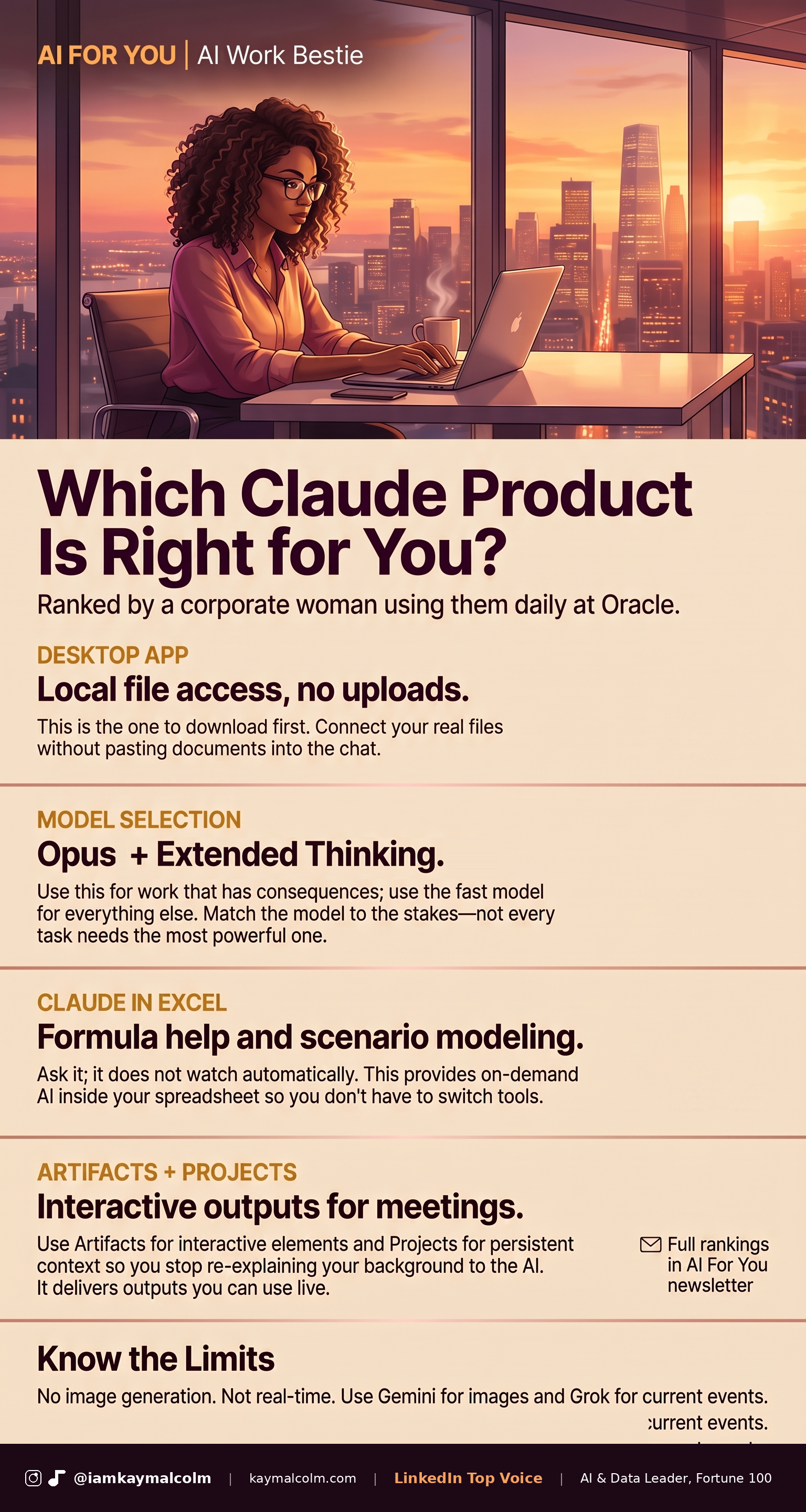
Which Claude Is Right for You?
Last month after my “Claude for beginners” newsletter dropped, my DMs were flooded with one specific flavor of follow-up message. Not “what is Claude”, that one seemed to resonate. The new question was: “Okay, but which Claude? I went to the website and there’s a desktop app, an Excel add-in, something called Artifacts, something called Projects. I must have downloaded the wrong thing. I don’t know what I’m doing.”
That is a fair and understandable place to be, especially when you are buay and have 1000 other things to do, AI sometimes feels like you are constantly behind. So let me break it down easy.
- Claude.ai is the website.
- Claude is also the desktop app (or mobile).
- Claude app has plugins like the Excel & PPT add-in.
Yeah they are all called Claude, yes it is confusing. Let’s figure out together the right thing for the right job and then you can go do drop off, dinner or whatever else is on your list (I need to go do the same).
So here is my handy field guide. Five questions your corporate brain is already asking or will ask. I answered them in order of what matters most.

- Q01: There’s a desktop app now. Do I download this?
- Q02: Which Claude model should I be using and does it matter?
- Q03: Claude in Excel sounds too good to be true. What is it?
- Q04: What is an Artifact and when would I use one?
- Q05: What is a Project and is it different from just having a long chat?
- Q06: Are there things Claude can’t do well that I should stop trying?
Q01: There’s a desktop app now. Do I download this
The desktop app is called Claude (Cowork in some early marketing, though the app itself just says Claude), and the answer is: yes.
The web version of Claude lives in a browser tab. I downloaded the desktop app and the mobile app once I was ready to really use it. The app lives on your computer so you can easily drag in a Word doc, a PDF, a spreadsheet, Claude reads it in context. When I’m reviewing a quarterly roadmap document and I want Claude to flag where our AI strategy language is vague or inconsistent, I don’t paste anything. I just open the file in the conversation. That alone is worth the switch from browser to desktop.
It runs on the Pro plan, which is $20 a month. For reference: that’s less than coffee and a bagel (side note, prices are sky high). Anyways, if you are using Claude for more than casual curiosity, the upgrade is worth it imo.
Q02: Which Claude model should I be using, and does it matter?
The model matters, and most people are not choosing intentionally, because they just don’t know.
When you open Claude, there is a model selector at the bottom of the chat window. As of today (the models change frequently), there are 4. Fable (my boo), Opus, Sonnet and Haiku in order of most capable to least capable.
Pro plans can use Haiku -> Opus (+ Fable pay as you go credits).
Max Plans can use Haiku -> Fable.
Free plans can use Haiku -> Sonnet.
There is also Effort levels. If you are starting out, I wouldn’t worry about this yet.
Each model uses up more of your usage the more capable it is (you check that by clicking on your name icon -> Settings -> Usage). With Claude you get a certain amount of usage in a window then based on your plan if you are doing a lot you have to come back in a few hours. Check out my Token Cost article for more on how to use tokens better.
Q03: Claude in Excel sounds too good to be true. What is it?
It is an AI add-in for Microsoft Excel. Now I just started using the PPT one too and it is the bomb! Back to Excel.
What it does: you install it from the Microsoft add-in store, and it puts a Claude panel on the right side of your spreadsheet. You can ask it questions about your data in plain English, ask it to write formulas, ask it to explain what a formula is doing, or ask it to model scenarios. For someone who has always felt slightly intimidated by complex Excel work, this is genuinely useful because you can describe what you want in words rather than remembering syntax.
What it does not do: it is not reading your entire spreadsheet and autonomously analyzing trends. It is responding to what you ask. The distinction matters because some people install it expecting it to just “see” their data and surface insights. It still requires you to direct it. Think of it less as a co-pilot that watches your screen and more as a very capable colleague in the seat next to you who will help when you ask.

Where I use it: financial projections for business cases. I work through scenarios in Excel and use Claude in the panel to pressure-test whether my formulas are doing what I think they are doing. It has caught logic errors more than once for me.

Q04: What is an Artifact and when would I use one?
An Artifact is Claude’s name for an interactive output, something it builds for you that you can use, rather than text you paste somewhere else.
Concrete examples: you ask Claude to build an expense calculator, and instead of giving you a formula, it builds a working calculator inside the chat window that you can type numbers into right now. You ask for a project tracker, and it builds a visual table you can interact with. You ask for a diagram of a process and it renders a real diagram, not a text description of one.
The thing that surprised me when I first used Artifacts: I asked Claude to build a decision framework for prioritizing product features, the kind of thing that usually takes me a few rounds of polishing in a regular doc. It came back as a working, clickable scoring tool where I could enter numbers for each feature and it ranked them automatically. We used it with my team that same afternoon, in a LiveLabs product meeting, without me touching it first.
Artifacts are available in the web version and the desktop app. The use case that makes them most useful for corporate professionals is any situation where you need something interactive, a calculator they can fill in, a framework they can score, a diagram they can read at a glance. If your output lives in a copy-paste block, it’s a response. If it runs and responds to input, it’s an Artifact.

Q05: What is a Project and is it different from just having a long chat?
Projects are persistent folders inside Claude where you can store documents and context that carry across every conversation in that project. It is different from a long chat because a long chat eventually hits Claude’s context window limit, it stops being able to reference things from early in the conversation because of first in, first out. A Project holds your documents separately, so they are always available.
I have a Project where I’ve uploaded my team’s current-quarter roadmap, our AI strategy document, and a plain-text file with my writing style and communication preferences. Every time I need Claude to draft something for my team, I open that Project and it already knows who I am, what my team is doing, and how I communicate. I don’t re-explain anything.
But if you are using the desktop app with local file access or Claude Code, you may find that covers some of the same ground. The desktop app can read files you already have organized on your computer. Projects are more valuable when the documents you want Claude to reference are things you will update regularly and want to maintain in one place inside Claude specifically, rather than on your hard drive.
One practical note before you start uploading: consumer Claude (Pro plan) is not the same as an enterprise license. General context, your working style, your team’s communication preferences, how you like information structured, is fine to put in Projects. Confidential product roadmaps, client data, and internal financials are NOT. For anything that would require IT approval to share externally, use your company’s enterprise-licensed tools. I use our Oracle enterprise subscription for OpenAI Codex for anything that touches confidential data, and I keep consumer Claude for the writing, analysis, and reasoning work on iamkaymalcolm that doesn’t.

Q06: Are there things Claude genuinely cannot do that I should stop trying?
Two honest limitations, because I would rather tell you now than have you discover them mid-project.
Claude cannot generate images well. This one surprises people because ChatGPT can now that GPT5.5 & 5.6 has been released (before they were not very good), and the tools are often discussed in the same breath. If you need AI-generated images for a presentation or social content, Claude is not your tool for that. Gemini (Google’s AI) handles image generation well too. Keep both available. I have an OpenAI key and Claude talks to ChatGPT to generate images (more on this later)
Claude’s real-time information is limited. It is not a live search engine. If you ask it about something that happened this week, or current stock prices, or breaking news, it will either tell you it doesn’t know or, and this is the more dangerous version, it will give you an answer that sounds confident and is out of date. For anything where recency matters, use a tool built for search or in Claude ask it to do use the web search tool. Grok (on X) and Google’s AI Mode in Search are both better options for real-time queries.
These are not reasons to avoid the tool, they are just limitations. Once you know where Claude’s edges are, you stop being frustrated by them and you start routing around them. For now keep Gemini in a tab for images, keep a search tool open for anything time-sensitive, and use Claude for the reasoning and analysis-heavy work where it has almost no equal right now.
The whole lineup, in one place:
- Desktop app: drag in your files, Claude reads them in context. Worth the switch from browser.
- Excel and PPT add-in: ask your spreadsheet questions in plain English, no formula syntax.
- Artifacts: a working tool inside the chat, not text you paste somewhere else.
- Projects: a folder that remembers your context across every conversation.
This week: open the Claude desktop app (if you haven’t already), start a new conversation, and drop in one document you are currently working on, a strategy doc, a deck outline, a project update. Ask Claude one specific question about it. Not a general “what do you think?”, something specific, like “where is the logic in this document weakest?” or “what is the one thing a skeptical reader would push back on?” See what comes back before you do anything else.

VP @ Oracle | LinkedIn Top Voice for AI | LinkedIn Learning Instructor | Views are my own
AI For You is a weekly newsletter for corporate women (and yes, the guys reading this too, welcome) navigating careers in the AI era. Real tools, real context, no tech background required.