Start Here: Claude
The mistake I see most often: people jump straight in without spending any time understanding what they are talking to. They get average results, assume Claude is overrated, and move on. I’m telling you it’s not overrated. But you can’t treat it like ChatGPT and expect different outputs.
I get DMs about this a lot. Claude is an AI chat assistant made by Anthropic, the same category of tool as ChatGPT, and most of the confusion clears up once you understand what you are working with. “Oh I’ve heard about Claude, I have no idea where to start.” So here it is. The guide I wish someone had handed me when I was first expanding my LLM toolkit. I manage an AI Database product management team at Oracle for a living so this isn’t fluff. The tool is easy to use once you understand what you are talking to. These five questions will get you there.
Am I saying you should abandon ChatGPT? No. I use both. In fact I use three just for different reasons: ChatGPT, Claude, and Gemini/NotebookLM. They are tools. So here are the five things we are going to explore.
P.S. Most of what I say here works in both ChatGPT AND Claude. So if you want to stay in ChatGPT that’s fine too.
- Q01: What is Claude, in plain English?
- Q02: Do I need to pay for it?
- Q03: How do I talk to it so I do not get crap back?
- Q04: What is Claude good at in a corporate setting?
- Q05: What should I NOT trust it to do?
Q01: What is Claude, in plain English?

Claude is a conversational AI, same category as ChatGPT. You open a browser tab or download the app, you type a message, and it responds. There is no dashboard to learn, no settings to configure before you can start. It works like a very long, very capable text conversation.
If you have used ChatGPT, you already know how to use Claude. It’s the same starting point. The differences show up in tone, reasoning depth, and how it handles long or complex tasks, but you are not learning something from scratch here. Open a tab, type a message, see what comes back.
Two things worth knowing upfront that do not show up in any of the marketing:
First, Claude will agree with you even when you are wrong. Researchers call this sycophancy. If you push back on something Claude told you, it may reverse course even if the original answer was correct. Treat Claude’s output the way you treat a first-round draft from a junior analyst on your team: read it critically, push on what does not sound right, and it gets better fast.
Second, tokens. Everything Claude reads and writes gets processed in chunks called tokens, roughly one per word. This matters when you are working with long documents. You do not need to count tokens. You just need to know the word exists so you understand what “context limit” means when you eventually hit it.
Q02: Do I need to pay for it?
There is a free tier. It gives you a limited number of messages per day, which is enough to try Claude but not enough to build any real workflow around it.
Pro is $20 a month. If you are using Claude more than a few times a week for anything work-related, this is the right starting point. It removes the daily usage limits and gives you access to Claude’s best models. That is the version I use every day.
Max ($100 to $200 a month) is for people processing extremely long documents or running Claude at high volume across the day. You do not need to start here. See how much you use Pro for a month before you even consider it. I do a lot of token conserving so I don’t have to use this.
My recommendation: try the free tier for one week. If you hit the usage limit before Friday, pay for Pro that same day and pay monthly. Do not commit to a higher plan until you know you will use it.
Which version of Claude should I get?
Download the phone app and browser app by going to claude.ai on the browser. The desktop app has Claude Chat, Claude Cowork and Claude Code. The browser can handle everything in this newsletter without setup. Download the desktop app when you want Claude to do more.
Q03: How do I talk to it so I do not get crap back?
Do this before you write your first prompt.
Create a file called about-me.md. In it, write four things: what you do for work, what you are currently focused on, one or two goals you are working toward right now, and one short paragraph that sounds like you. A Slack message, an email, something you have written and sent. If you don’t know what to write, have Claude email you, prompt below.

Then set up a Project in Claude.ai and drop it in. Claude reads it automatically at the start of every conversation inside that project. You stop being a stranger to it, and Claude stops giving you output that sounds like it was written for everyone and no one. Set it up once, never paste again.
How to set up a Project:
- Go to claude.ai and sign in
- Click Projects in the left sidebar
- Click New Project and give it a name (something like “Work” or “My Workspace”)
- Click Project Instructions and paste your about-me content directly there
- Every conversation you start inside this project now has that context automatically
[SCREENSHOT: Project Instructions panel in claude.ai with an example about-me filled in]
Don’t know what to write? Use this prompt to build yours:
I want to create a short about-me.md file so Claude always
knows who I am before I ask for anything. Ask me 5 questions
one at a time, then write the file when you have my answers.
Keep it under 200 words. Plain text, no fluff.
Paste that in, answer the questions, and Claude builds the file for you. The whole thing takes ten minutes.
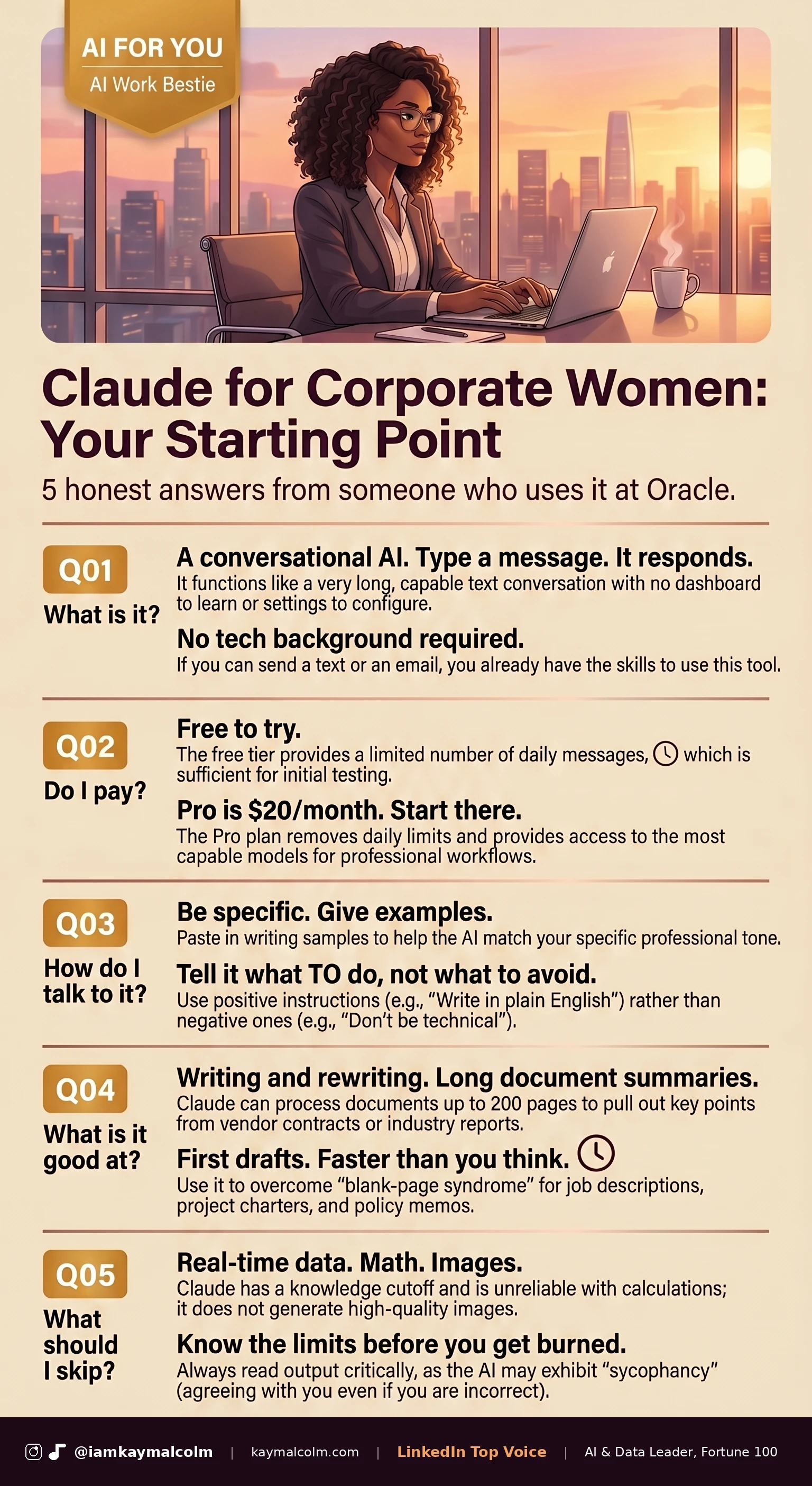
This is the question everyone has but no one has the courage to ask out loud. They feel like everyone has this already figured out (newsflash…they don’t).
The most common mistake is being vague. “Help me write a better email” gives you a generic email that does not sound like you and does not solve the real problem. “Rewrite this email to my VP to request a 90-day extension on the project timeline. Keep the tone professional and direct. She values brevity. Here is the original:” gives you something you can use.
Five things that make the difference:
- Be specific about what you want. Output quality rises almost directly with how specific your request is.
- Give examples. If you want the output to sound like you, paste in several writing samples you have written. “Match the tone of this” does more work than a paragraph of style instructions.
- Tell it what to DO, not what to avoid. “Write this in plain English” is better than “don’t make it sound technical.”
- Start small and build. Ask for a first draft, then ask for edits. One enormous prompt with twenty requirements almost always produces something average, the LLMs are wired to give you good enough. So start then tweak is better than get it perfect on the first run.
- Start a fresh chat when you change topics. Claude reads the entire conversation as context for every new response. A cluttered conversation produces cluttered output.
Q04: What is Claude good at in a corporate setting?
Three things, and knowing them upfront will save you a lot of frustration when you go looking for something it cannot do.
Writing and rewriting. Paste in something you wrote. Ask Claude to make it shorter, clearer, or more direct. The output will not always be better, but it will almost always give you a useful direction. I use this to tighten slide bullet points and punch up long emails before I send them. It is one of the lower-stakes ways to start because the worst outcome is you ignore the suggestion and send your original.
Summarizing long documents. Claude can process documents up to 200 pages (convert it to markdown to watch token usage) and summarize the content, pull out key points, or answer questions about what is inside. Things like vendor contracts, industry reports, and public meeting transcripts can be analyzed. In corporate common sense matters, do not paste in private data from your company onto a public LLM. My company has a private enterprise subscription to an LLM so I can use it without concern of leaking private company data.
First drafts. Job descriptions, project charters, proposal outlines, policy memos. Give Claude the context, ask for a draft, and start from there. It cuts the blank-page problem in half, which in my experience is the hardest part of most writing tasks. Here are two you can try in the next ten minutes:
The follow-up email you’ve been putting off:
I just came out of a meeting with [name/title] about [topic].
Here are my rough notes:

[paste your notes]

Write a follow-up email that recaps what was decided,
confirms next steps, and keeps the door open for questions.
Tone should be professional but not stiff. This person
outranks me but we have a good working relationship.
Keep it under 150 words.
Speaker notes for a presentation:
Here are the bullet points from my slide deck:

[paste your bullets]

Write the talking points I would say out loud
for each slide. Conversational, not scripted. About
30 seconds of content per slide. I present to senior
leadership so the language should be confident and direct.
Paste either one in, fill in your details, and see what comes back. Then edit from there. That is the whole workflow, and it gets faster every time you do it.
Q05: What should I NOT trust it to do?
Here are three real limitations that will save you from an embarrassing moment if you know them now:

Real-time information. Claude’s knowledge has a cutoff date. It does not know what happened this week, this month, or probably this year. If you ask it to pull the latest earnings data or summarize current events, it will produce something confident and wrong. Use it for thinking and writing, not for research that requires fresh information.
Math. Claude is unreliable with numbers, and the frustrating part is it sounds completely certain even when it is wrong. If the calculation matters, verify it yourself or run it through a real calculator.
Image generation. Claude cannot create images well. That is a different category of tool entirely (I use Gemini and NotebookLM). I have found Claude is good at reading and writing text. Keep those two categories separate in your head and you will save yourself a lot of confusion.
The limitation that trips up most people, though, is not any of the three above. It is expecting Claude to read their mind. Most people who feel like Claude is not working are only giving it half the information it needs. Tell it who you are, what you are trying to accomplish, who the audience is, and what format you need, and the output quality jumps noticeably. I noticed that difference in my first week.
This week, pick one question and try it. Q04 has two prompts you can copy and use in the next ten minutes.

VP @ Oracle | LinkedIn Top Voice for AI | LinkedIn Learning Instructor | Views are my own
AI For You is a weekly newsletter for corporate women (and yes, the guys reading this too, welcome) navigating careers in the AI era. Real tools, real context, no tech background required.