AI does not sound like you
Something shifted for me about eight months ago, when I was looking at a draft that came back from an AI tool and it sounded nothing like me. Professionally acceptable and completely hollow. And I had given it good context. I had described my role, the audience, the tone I was going for. The output was still… generic.
The problem was that I had given AI context about me the way you fill out a form: job title, audience, tone descriptor (“professional but warm”). That tells the model almost nothing about how I communicate in practice. What I needed was a voice file.
A voice file is just what it sounds like: a compressed document that captures the specific behavioral patterns, preferences, and hard stops that make your writing sound like you rather than like everyone else who typed “professional but warm” into a prompt. Once I built mine, the quality of everything I generated changed. I use it across Oracle product communications, this newsletter, LinkedIn, and the LinkedIn Learning courses I create. One file, consistent voice, reliable output every single time.
Here is how to build yours.
What is a voice file and how do I make one?
A voice file is a short markdown document of the concrete rules that make your writing sound like you. You build it in five steps: interview yourself, compress the answers, store it where AI can find it, test it, and maintain it.
Step 01: Run the Self-Interview

The raw material for your voice file is a structured conversation with yourself, using AI to draw it out. The goal is to surface the specific decisions you make automatically in your writing, choices you have never had to articulate because you have never needed to, until now.
Set up a conversation with Claude and use this prompt to generate your questions:
I am building a voice file to help AI generate content that sounds like me.

Please generate 100 interview questions I can answer to capture my voice, writing style, and professional perspective.

Structure them across these seven categories:
1. contrarian beliefs about my field (15 questions)
2. how I construct sentences and paragraphs in practice (20 questions)
3. stylistic choices that make me cringe in my own drafts (15 questions)
4. my personality and voice qualities (15 questions)
5. how I structure arguments and narratives (15 questions)
6. what I will never write no matter what (10 questions)
7. patterns in other people's writing that signal low quality to me (10 questions).

Number each question and group them by category.
That is 100 questions total. Do not sit and type your answers out. Use Wispr.ai (it’s free and a voice dictation tool that learns how you talk) to talk through your answers and let them run long. You are having a conversation, not filing a document. The goal is 15,000 to 20,000 words of raw material that you have never written down before.
When I did mine, questions I thought were obvious (“Do you prefer shorter sentences?”) turned out to have specific, conditional answers I had never made explicit. My honest answer was: shorter when I am making a point, longer when I am explaining something with texture. Knowing that changed how I gave AI instructions. “Write shorter sentences” had always produced output that felt clipped. The conditional version produced something that matched the way I write.
Step 02: Compress the Raw Material
Twenty thousand words of self-interview is your raw material, not your finished voice file. The compression step is where the real work happens.
Take your raw transcript and ask Claude to help you distill it into a structured markdown document. The target length is 2,000 to 5,000 tokens (roughly 1,500 to 3,800 words). That range is not arbitrary. Too short and the file will not have enough concrete rules to shift anything. Too long (above 5,000 tokens) and most AI tools will stop loading it reliably as context; I have seen this happen firsthand with files that crept past the ceiling.
Use this prompt to run the compression:
Here is my raw voice interview transcript. Compress it into a structured markdown voice file between 2,000 and 5,000 tokens.

Include:
- Specific behavioral rules with concrete examples. Not "I like clarity" but "I cut any sentence that uses 'leverage' as a verb."
- Examples pulled directly from the transcript where the example does more work than a description.
- Explicit refusals: things I will not write, structures I will not use, words I have banned from my vocabulary.
- Decision rules for contexts where my approach varies (e.g., internal versus external audiences).
- Taste signals: what signals quality to me and what signals its absence.

Do not include general values statements, vague personality descriptors, or anything that sounds like a bio.

[paste your raw transcript here]
What does not belong: general values statements, vague personality descriptors, anything that sounds like a bio. Take “I am passionate about making complex topics accessible.” That tells an AI nothing about how you write. It describes a feeling, not a behavior. Compare that to “I cut anything that sounds like a TED Talk opener and rewrite it in the second sentence.” One sentence and the model knows where to start.
Run the compression twice. Once by asking Claude to distill the raw material, and again by reading the output yourself and cutting anything that does not feel load-bearing. The second pass is where you add the examples and edge cases Claude will not invent on its own.
Step 03: Store It Where AI Can Find It

A voice file you have to paste manually into every conversation will become a voice file you stop using. The whole point is removing friction.
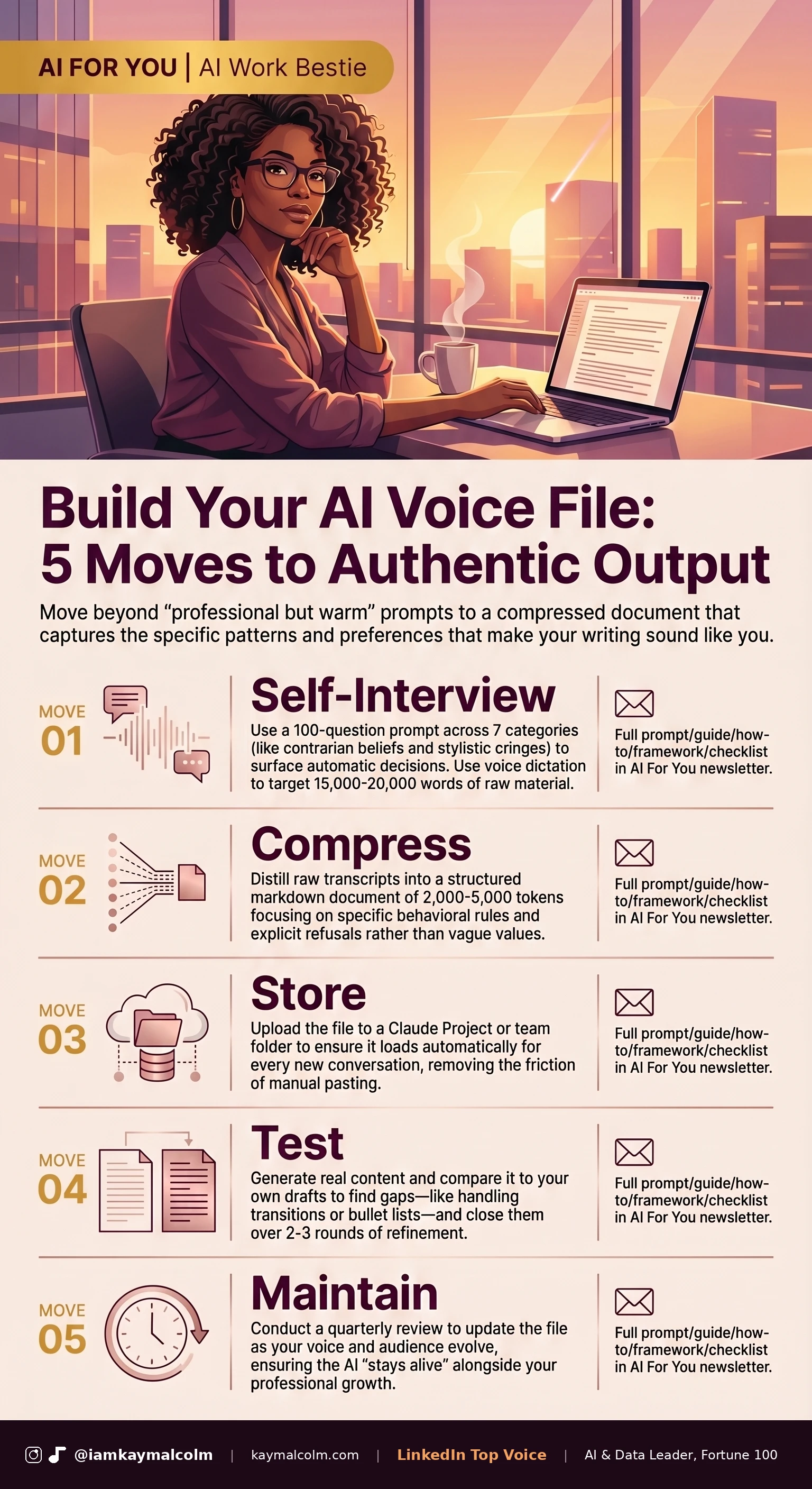
If you use Claude regularly, the most practical approach is a Project.
If you work across multiple AI platforms or want the file available for other team members or contractors you delegate work to, store the master version somewhere cloud-accessible and add the current version to whichever tools you use most. Part of what makes it so useful is portability: it is plain text markdown, so it loads into any tool without special setup.
At Oracle, I manage an AI Database product management team that creates a significant volume of written content: product documentation, external communications, internal updates, content for courses. The voice file approach works at the team level, not just the individual level. When a teammate generates a first draft, they load the voice file and the output starts from the right place rather than from a generic baseline. The editing workload drops noticeably.
One note on security: your voice file will contain specific behavioral patterns and writing preferences, but it should not contain anything confidential. Stylistic rules and taste signals are safe to load into external AI tools. Client data, product roadmaps, internal strategy documents are not.
What is Claude Projects?
Claude Projects let you upload files that load automatically every time you start a conversation within that project. Put your voice file there. From that point forward, every piece of content you generate inside that project already has your voice file loaded as context, without any extra steps from you.
Step 04: Test It and Close the Gaps
A voice file works when you cannot tell the difference between something AI drafted and something you would have written yourself on a good day. That bar is higher than it sounds, and you will not hit it on the first version.
Take a piece of writing you need to produce anyway and use this prompt:
Using only my voice file as your style guide, write [describe the piece you need]. Apply no other style instructions, only what is in the voice file.

[paste your voice file here]
Compare the output to your own drafts. Pay attention to the specific moments where the output diverges from what you would have done. Those gaps are what you add to the file.
Common gaps I found in my first version: how I handle transitions between sections (my instinct is to make them explicit rather than let the reader infer; I had not written that down), how I treat bullet lists (I prefer them for scannable information, but I avoid starting more than one consecutive list in the same section), how I open a piece (I do not start with a question, a stat, or a scenario; I start with something that happened or something I noticed).
None of that was in my first version because I had never needed to articulate it. The test-and-close process is how the file gets good. Plan for two or three rounds of testing before the output is reliably on target.
Step 05: Maintain It Like a Living Document

Your voice file is not done when you finish the first version. Your voice changes as you publish more, as your audience grows, as the topics you cover shift. The file should change with it.
Set a reminder to review it quarterly. When you do, use this prompt:
Here is my current voice file. I want to do a quarterly review. Audit it for:
- Rules that may be outdated or that I have evolved past
- Anything vague or hard for AI to act on
- Gaps: writing decisions I make consistently that are not captured here

I will share 2-3 recent pieces I am proud of. For each one, identify what I did that is not yet in the voice file.

[paste your voice file here]
[paste 2-3 recent pieces here]
Read through the output and notice which rules still feel true and which ones no longer match how you write now. Add any new hard stops you have discovered. Remove rules that have become too rigid or that you have evolved past.
The practical benefit of maintenance is not just quality control. It is that you are forced to stay conscious of your own stylistic choices rather than letting them drift without noticing. I will be honest: I skipped my first quarterly review and immediately regretted it, because three months of new writing habits had accumulated with nowhere to go. Some of the most useful updates I have made to mine came from moments when I read a piece I was proud of and asked, “What did I do there that I would not have known to instruct AI to do?” Then I wrote that down.
This week: open a conversation with Claude and answer 10 questions about your own writing. Pick any two categories from Step 01, run five questions each, and talk rather than type. You do not need the full 100 to see the value. Ten honest questions will show you patterns you have never named.
Building a voice file, in five steps:
- Run a self-interview and talk, do not type, your answers.
- Compress the raw material into a 2,000 to 5,000 token markdown file.
- Store it in a Claude Project so it loads automatically.
- Test it against your own drafts and close the gaps.
- Review it quarterly so it keeps up with how you write.

VP @ Oracle | LinkedIn Top Voice for AI | LinkedIn Learning Instructor | Views are my own
AI For You is a weekly newsletter for corporate women (and yes, the guys reading this too, welcome) navigating careers in the AI era. Real tools, real context, no tech background required.