You don't have to know how to code.
Vibe coding was named Word of the Year in 2025 by Collins Dictionary.
I have yet to see anyone explain it to the women running operations at work or their own businesses every day, the ones who don’t have a developer on speed dial.
So here we go, ladies this is for you. Read till the end, I built a Mix and Mingle game for my hubby’s birthday that was a hit, prompt for that is below too. Vibe Coding is for work but why not use it for fun too.
What is vibe coding?

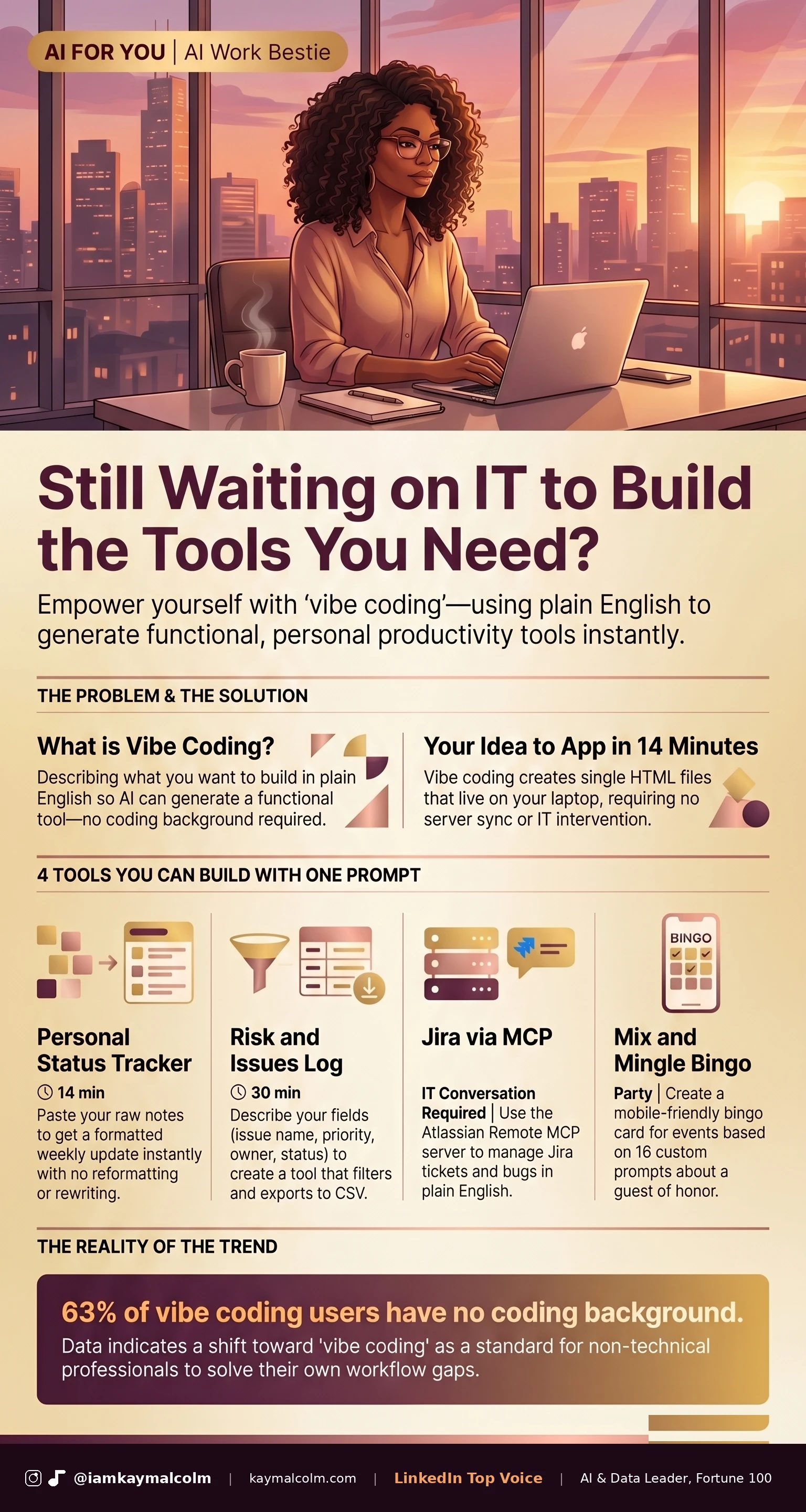
Vibe coding is when you describe what you want to build, in plain English, and AI builds it. There’s no syntax involved. You’re not learning to code. You describe what you need, the way you’d explain it to a new assistant, and the AI handles the rest.
The tool it builds is usually a single HTML file that opens in a browser tab. It lives on your laptop, doesn’t sync to a server, and doesn’t send your data anywhere. Open it when you need it, close the tab when you’re done.
I tested this last month. I wanted a tracker for my content: every post logged with its number, topic, format and notes. I described it the way I would explain it to a new assistant. Fourteen minutes later I had a working tool running in a browser tab. I still use it every week.
What vibe coding is not
Before I send you the prompts, a quick reality check. This is not enterprise software. The developers on your IT team are not threatened by it. It won’t rebuild your company’s CRM or automate your HR systems. Those projects are still engineering work, full stop.
What it does is remove the bottleneck between your idea and a personal tool that helps you specifically. The sweet spot is productivity tools that lives in your browser, runs on your laptop, and helps you do your job faster, without involving IT, touching company systems, or handling data you shouldn’t be passing to an AI.
An HTML file in your downloads folder is not a security risk. An app you built that pulls live data from your company’s database is a completely different conversation, and one your IT team needs to be in the room for. Know the difference. And don’t forget security and complexity. Comp Sci friends, architects, we still need you so don’t come for me in the comments.
Move 01: The Prompt Structure | 5 min to write
Every good vibe coding prompt has four parts. Write all four before you start.
1. What it is: what does this tool do? (one sentence)
2. What goes in: list every field or input by name
3. What comes out: what do I see, click, or download?
4. Format:
   a. single HTML file that runs in a browser, no libraries, no server
   b. app that runs on your computer
   c. app that runs on a server
The more specific part 2 is, the better the tool output. “I want to track things” builds nothing. “I want to track vendor name, contract date, renewal date, and contact email, and filter by renewal date” builds you a usable vendor tracker.

Move 02: Your First Build - Personal Status Tracker | 14 min
If you send a weekly update to your manager, this is the tool for you. You paste in your notes. It formats the update for you, every time.
Here is the full starter prompt:
Build me a personal status tracker. I paste in my raw bullet notes
from the week and the tool formats them into a clean weekly update
for my manager. Format: three wins, two blockers, priorities for
next week. One paragraph each. No bullet points, my manager reads
on mobile. Build it as a single HTML file that runs in a browser.
Start simple and show me the first version.
Open your AI tool of choice, Claude, ChatGPT, Copilot. Copy this. Fill in the format details for your own weekly update. Hit submit.
Move 03: The Mix & Mingle Bingo Game (for a Party)
This one ran all night at my husband’s 50th birthday party. A bingo card where every guest opens the file on their phone, mingles with the room, and finds someone who matches each square. For example: “Has known Jeff 20+ years,” “Was at Jeff’s wedding,” “Has been to Jamaica with Jeff.” Tap a square, type the person’s name to stamp it. First to complete a row wins. It’s a single HTML file that guests open directly on their phone, no download, no sign-up required. I described it to Claude and had a working version in under an hour.
Use this prompt to build yours:
Build me a Mix & Mingle Bingo game for a party. Single HTML file that runs
in a browser, no server, no external libraries, every guest opens it on
their phone.

The game: a 4x4 grid with 16 squares and one free space in the center.
Each square is a prompt guests match by finding someone in the room,
for example: "Has known [GUEST] X# years," "Was at [GUEST]'s wedding,"
"Shares a birthday month with [GUEST]." Guests tap a square when they
find a match and type the person's name to stamp it. Free space: take a
photo with [GUEST] and post with [HASHTAG]. Game ends when someone
completes a row, column, or diagonal.

Give me a spot to upload the guests photo at the top. Design it with these colors and accents [COLORS/ACCENTS]. I will give you the guest of honor's name,
the 16 square prompts, and the hashtag before we start. Start simple and
show me the first version.  Ask me any clarifying questions before we begin.
Swap [GUEST], [COLORS/ACCENTS] and [HASHTAG] for your event, give Claude 16 fun facts about the guest of honor, and you will have it running before the party starts.
Move 04: The Intermediate Build - Enterprise Risk Dashboard | 30 min
For anyone maintaining a RAID log, or juggling multiple tabs of risk logs across Projects, Vendors, and IT Security, this replaces all of it. One browser tool. Filter by priority, sort by date, export to CSV. No more version 47 of that spreadsheet.
Build me an Enterprise Risk Dashboard. I want to track risks and issues
across three areas: Projects, Vendors, and IT Security. Each row should
include: area, issue name, priority (High / Medium / Low), owner, status
(Open / In Progress / Resolved), target resolution date, and notes.
I want to filter by area, priority, and status, sort by resolution date,
and export the table to CSV.
Here's a sample of the file [upload spreadsheet]
Build it as a single HTML file that runs in a browser. Start simple.
Move 05: The Advanced Option - Jira via MCP | IT conversation required
If you manage tickets in Jira, this is worth bringing to your IT team.
Atlassian released an official Remote MCP server in 2025. Once IT enables it, you connect your AI to Jira and manage tickets in plain English. “Log a bug for the login issue we discussed, P1, assign to Marcus” and it’s done. I have my Codex (OpenAI’s answer to Claude Code) setup so anytime I interact, it asks me, should I add this to Jira or update the Jira ticket.
The question to ask your IT team: “Has our company enabled the Atlassian Remote MCP server for Claude or Codex?” If they have not heard of it, send them this: Atlassian launched it in 2025 and it is purpose-built for this use case. I use it at work and I love it. Here’s the starter prompt to build it. I can’t take the credit for this one, Pat Shepherd had the brilliant idea for this one and Mary Hess refined it.

This week, pick one of the four and give it a real try (the status tracker takes one lunch break, I promise). I have been in enterprise tech for 20 years and the thing that still gets me is how fast a working tool shows up when you describe what you need. That part does not get old. The status tracker is the fastest starting point. You will have something running before your next Friday update is due.
Don’t forget to come tell me on LinkedIn what you built.
What you can build this week:
- A personal status tracker that formats your weekly update from raw notes.
- A party bingo game every guest opens on their phone.
- An enterprise risk dashboard that replaces version 47 of the spreadsheet.
- Jira in plain English, once your IT team enables the MCP server.

VP @ Oracle | LinkedIn Top Voice for AI | LinkedIn Learning Instructor | Views are my own
AI For You is a weekly newsletter for corporate women (and yes, the guys reading this too, welcome) navigating careers in the AI era. Real tools, real context, no tech background required.