How to start using AI
I’ve been getting one question more than any other lately.
“Kay, I know I need to start using AI. But where do I even begin?”
And I get it. I really do. The options are overwhelming. Everyone has an opinion. There are 100 AI bros screaming on social media to buy their stuff. Half the content out there is either too technical or too vague to be useful. Here is the plain version nobody gives you: tools like ChatGPT and Claude are chat assistants you talk to in your own words, typing what you need and reading what comes back, no special training required to start. And there’s this quiet anxiety underneath it all: what if I try it and I look like I don’t know what I’m doing?
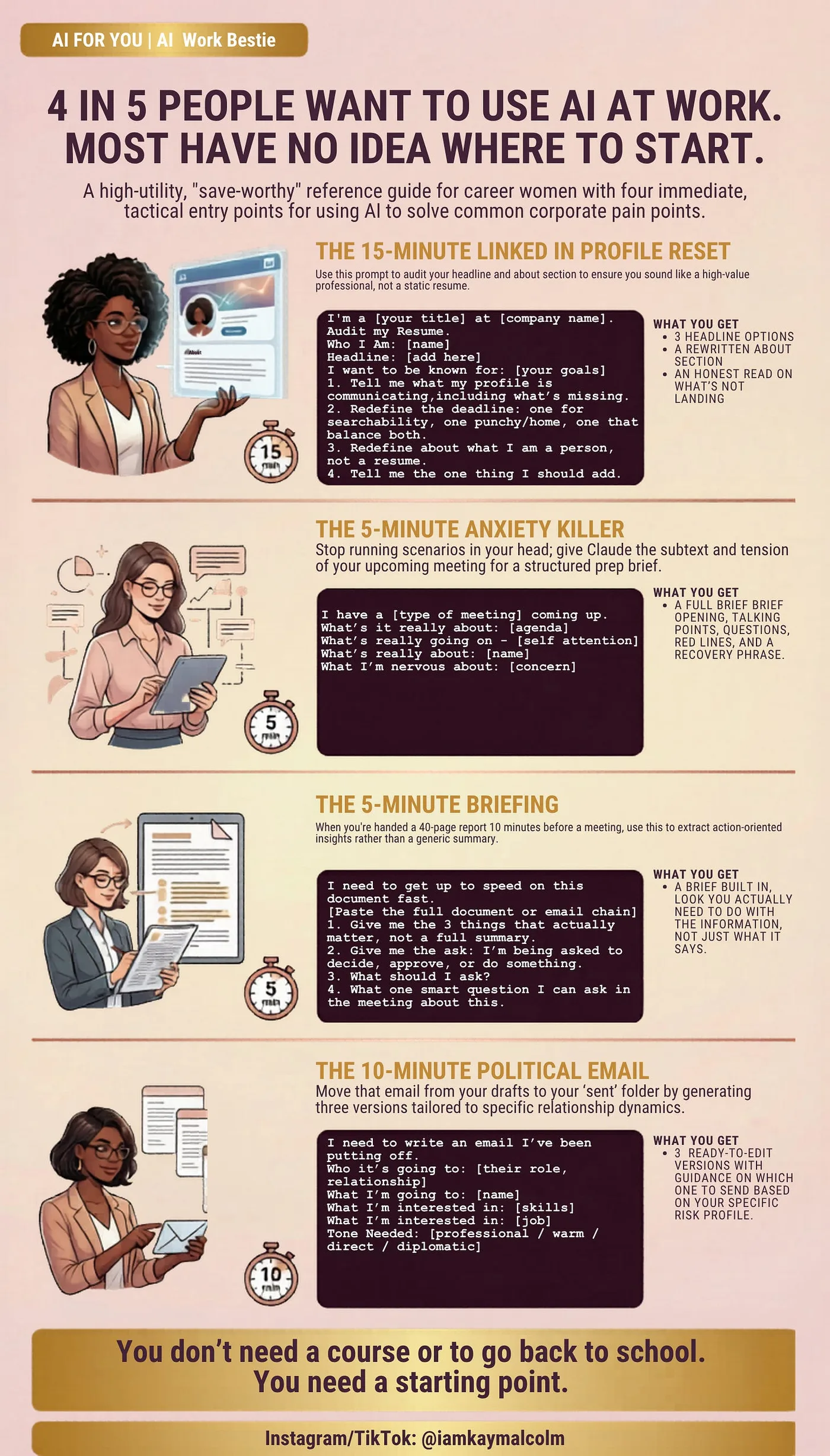
Not a reader? No problem! Scroll down to the end ⬇️ for 4 free prompts in a handy guide that I use at my job. Upload straight to your phone Claude app.
Today, I’m giving you what I wish someone had given me when I started, Work Bestie style: a simple starting point and 4 real prompts that they have used themselves. So here are my prompts straight out of my Claude history.
Where do I even begin with AI?
Start with one tool and one real work problem. Pick Claude, open it, and run one of the four prompts below on something already on your plate this week. That is the whole start.
Start with Claude.
Claude is made by Anthropic. There’s a free version at claude.ai. I personally invest in the $20 pro version.
Kay did you try any others?
I did. I had the pro version of Gemini and Chatgpt as well. Claude is the only one I kept and NO ❌ you do not need the max version, keep following me, I’ll help save your coins.
Why should I, I don’t trust AI, its overhyped.
Think of AI like having a really smart, really available colleague you can text anything to, one who will give you a thoughtful, direct answer every time.
It won’t judge you. It won’t treat you like you are dumb. It will just be useful.
Meet my new boyfriend Claudie.
I use Claude every single day, he’s my boyfriend, we go together (don’t tell my hubby, he gets jealous🤣). Claudie helps me with thinking through hard problems. For writing things I’m dreading. For planning and strategizing. Even troubleshooting errors on my mac laptop. For things I haven’t figured out yet. It has become the tool I reach for the way I used to reach for Google, except the answers are tailored to my situation, not a list of links.
You are busy, you have kids to pick up from school, dinner to think about, a demanding boss or maybe you were just laid off and now you need to up your game.

1. Your LinkedIn profile: whether you’re looking or just overdue
You don’t have to be actively job searching for this to matter. But if you were impacted by layoffs this one you need to do and fwd to anyone else you know who might have been impacted.
Most people haven’t touched their LinkedIn since their last job search😱. The headline is their job title. The about section reads like a resume. They’re not showing up in searches they should be showing up in, and when someone important looks them up, nothing about the profile says *this is a woman you need to know.*
Open Claude. Open your LinkedIn profile. Copy your headline and about section and paste them in, better yet take a screenshot of the whole page and upload it. Then send this prompt.
📋 THE LINKEDIN AUDIT PROMPT (copy this)
I’m a [your title/role] at [company type, you don’t have to name the company].
I want to audit and improve my LinkedIn profile.
Here is my current headline:
[paste it]
Here is my current about section:
[paste it]
Here’s what I want people to think about me when they find my profile:
[what you want to be known for, what kind of opportunities you want,
how you want to be perceived]
Please:
1. Tell me honestly what my headline and about section are communicating
right now, including what’s missing and what’s not landing
2. Rewrite my headline, give me 3 options:
- One optimized for searchability
- One that’s punchy and human
- One that balances both
3. Rewrite my about section so it sounds like a real person, not a resume.
Keep my voice. Make it clear what I do, who I help, and what makes me
worth paying attention to.
4. Tell me the one thing most people at my level are missing on their
LinkedIn that I should add.
Whether you’re actively searching or just overdue for a refresh, what comes back will be better than anything you’d write on your own, because Claude can see what you can’t see when you’re too close to your own profile.
This is the reset most corporate women keep putting off. Fifteen minutes. Done.
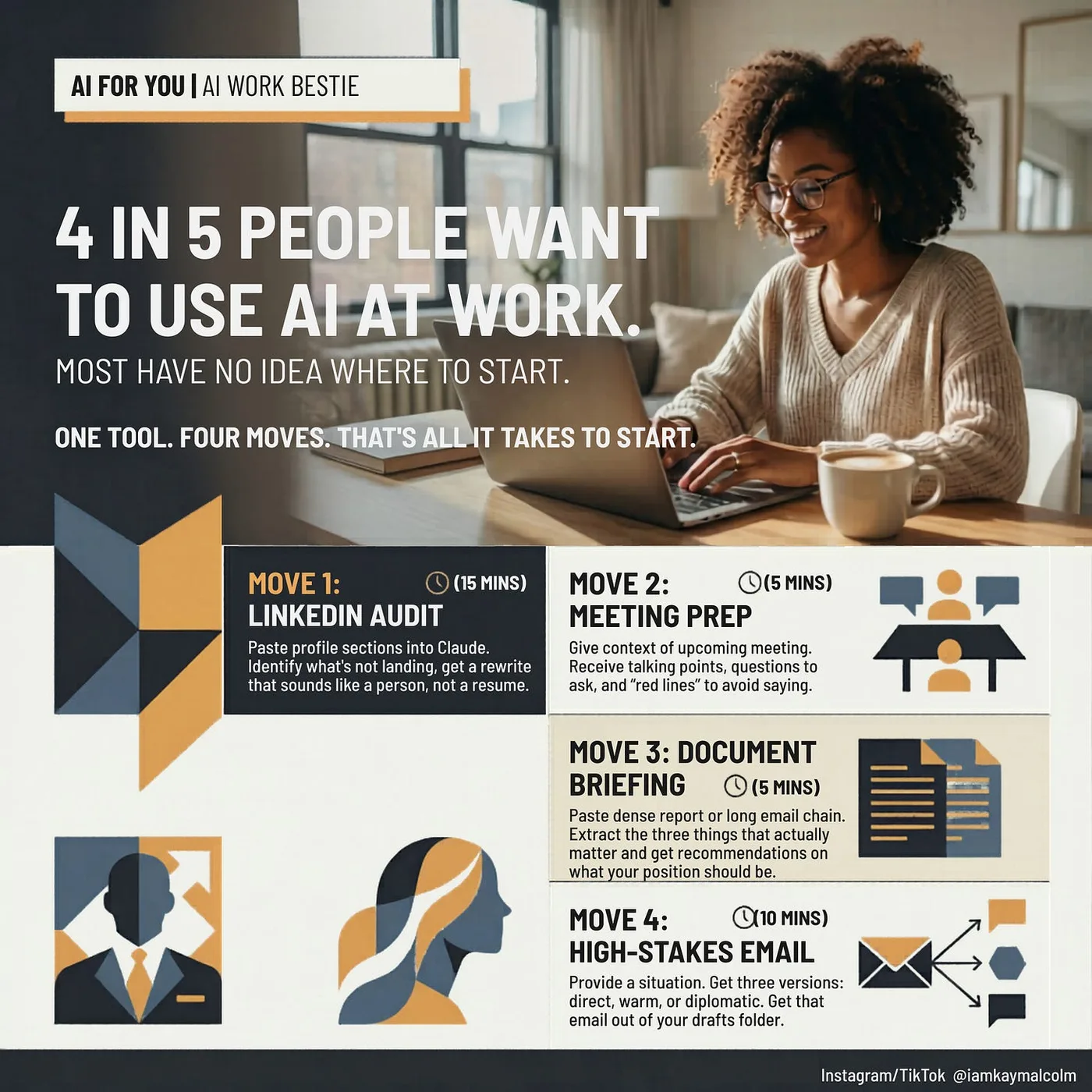
2. Meeting prep: the one that will immediately make your life better
You have a meeting on your calendar that’s making you slightly anxious. Maybe it’s a skip-level. Maybe it’s a difficult conversation. Maybe it’s a high-stakes update and you’re not totally sure how to frame things.
Open Claude, copy this prompt, fill in the brackets, and hit send.
📋 THE MEETING PREP PROMPT (copy this)
I have a [type of meeting, e.g. skip-level, performance review, project update,
difficult conversation with a peer] coming up [tomorrow / this week].
Here’s the context:
- Who will be in the room: [names/titles/roles and your relationship with each]
- What this meeting is officially about: [the agenda or stated purpose]
- What’s really going on underneath: [any tension, history, or subtext worth knowing]
- What I want to walk out of this meeting with: [your goal: a decision,
approval, clarity, to be heard, to set a boundary, etc.]
- What I’m nervous about: [the part that’s keeping you up at night]
Based on all of this, please help me:
1. Open the meeting strong, give me an opening 2-3 sentences that set the
right tone without sounding scripted

2. Give me 4-5 talking points I should make sure I hit, in order of priority
3. Give me 3 questions I should ask, including at least one that puts the
ball back in their court
4. Tell me what I should NOT say or do in this meeting and why
5. If things go sideways, give me one grounding phrase I can use to reset
the conversation without losing my footing
What comes back will be more thorough than an hour of anxious prep on your own. You’ll walk in with a structure, real talking points, and the questions you should be asking, including the ones you wouldn’t think to ask when you’re nervous.
One thing: be honest in the “what’s really going on underneath” section. The more real context you give Claude, the better the prep gets. It’s not going to judge you. Use that.
3. The document you can’t avoid reading
You know this one all too well.
Someone forwards you a 40-page report, a dense policy update, or an email chain with 50 replies. The meeting starts in 10 minutes and you’re expected to speak to it. Or it’s been sitting in your inbox for a week because there’s no way you’re reading all of that. Reply all really should be banned
Open Claude, paste the document or email chain, and send this prompt. (Warning: Be smart, if you have an enterprise account go crazy, but don’t paste company secrets, you will get in trouble)
📋 THE DOCUMENT BRIEFING PROMPT (copy this)
I need to get up to speed on this document quickly. Here it is:
[Paste the full document, report, or email chain]
Please give me:
1. The 3 things that matter most in this document. Not a summary of
everything. The 3 things I need to know.
2. What the ask is. Is someone asking me to do something, decide something,
or approve something? If yes, what exactly?
3. What my position should be. Based on what’s in here, what should I be
thinking, agreeing to, pushing back on, or asking more about? Give me some ideas.
4. If I’m going into a meeting about this, give me one smart question I can
ask that shows I’ve read it.
What comes back is not a summary. It’s a brief built around what you need to do with it. The difference matters.
This is the one most corporate women use every single day once they start. Because the pile of “things I have to read but haven’t” never gets smaller. This makes it manageable.
4. The high-stakes email
The one you’ve opened and closed five times this week. The one where you’re not sure how to say what needs to be said without it coming out wrong. The one that’s been sitting in your drafts because you can’t figure out how to start it, and because the stakes feel too high to get it wrong.
Open Claude, copy this prompt, and fill in the brackets.
📋 THE HIGH-STAKES EMAIL PROMPT (copy this)
I need to write an email and I’ve been putting it off. Here’s the full situation:
What happened: [describe the situation honestly: what occurred, what was said
or not said, what the impact was on you or your work]
Who this email is going to: [their name, their role, your relationship with
them, and how much power they have relative to you]
What I want from this email: [be specific: an apology, a correction,
a boundary set, a decision made, clarity on something, accountability for
something]
What I’m worried about: [what could go wrong if this is worded badly: being
seen as difficult, damaging the relationship, not being taken seriously, etc.]
Things I absolutely cannot say or imply in this email: [anything off-limits]
Tone I need to hit: [professional but firm / warm but clear / direct without
being aggressive / other]

Please write me three versions of this email:
Version 1: Direct. Gets straight to the point. No softening.
Version 2: Warm but clear. Still says everything that needs to be said, but
leads with relationship first.
Version 3: The diplomatic middle ground. Firm on the issue, soft on the person.
For each version, also tell me: what’s the risk of sending this one, and who
is it best suited for.
Pick the version that feels closest to your voice. Adjust it so it sounds like you, not like a press release or an HR manual. Send it. (How to edit AI-generated copy to sound like you is a whole skill set on its own. I’ll break it down in a future issue.)
The email that could make or break something gets done in ten minutes. That’s the whole point.
That’s it. That’s where you start.
One tool. Four use cases. Under 15 minutes each.
I know there’s pressure to learn everything at once, every new tool and feature the minute it drops. Ignore that pressure. The women who are getting ahead with AI right now didn’t start with a course or a certification. They started with one real work problem and a tool that could help them solve it.
That’s what I want you to do this week.
Try one of these four. Just one. Then come tell me on LinkedIn how it went.
P.S. I included the exact prompts for all four in the reference guide below. Download it, save it to your phone, upload it to the claude app on your phone and use it this week. If it works for you, share with your friends.
VP @ Oracle | LinkedIn Top Voice for AI | LinkedIn Learning Instructor | Views are my own
AI For You is a weekly newsletter for corporate women (and yes, the guys reading this too, welcome) navigating careers in the AI era. Real tools, real context, no tech background required.